Free UK Mainland Shipping on Orders Over £25 (ex VAT)


TENS Machines
(14)
£26.34 £39.00
Combo 2: TENS, EMS & Massage Machine
£50.39 £79.99
Med-fit Wireless 2 Channel TENS & EMS Machine
£45.54 £61.95
Combo 4: TENS, EMS & Massage Machine
£69.95 £99.95
Med-Fit Wireless 4 Channel TENS & EMS Machine
£76.95 £95.00
£79.95 £99.95
Our TENS machines give you a simple, drug-free way to manage everyday aches and long-term pain at home, at work or on the move. Choose from wired and wireless models, from single channel units for one area to four channel machines that cover your back, legs and shoulders in one session. Whichever TENS machine for pain relief you choose, it comes with instructions to help you get started.
TENS machine
A TENS machine is a small, battery-powered device that sends gentle electrical pulses through sticky pads on your skin. TENS stands for transcutaneous electrical nerve stimulation. You place the pads on or around the area that hurts, switch on and turn the strength up until you feel a clear but comfortable tingling.
The NHS describes TENS as a treatment that gives temporary pain relief, and says it can help with period pain, sports injuries and pain from conditions such as arthritis. It also points out that TENS doesn't work for everyone. If you're not sure whether it's for you, our honest look at the pros and cons of a TENS machine is a good place to start.
How does a TENS machine work?
There are two main ideas behind it, and the setting you choose decides which one you're using.
On higher frequency settings, the pulses stimulate the nerves that carry touch. The gate control theory, first described by Ronald Melzack and Patrick Wall in 1965, suggests these signals compete with pain signals on their way to the brain, so fewer pain messages get through. It's the same reason rubbing a knock makes it feel better.
On lower frequency settings, the stimulation is linked to the body releasing endorphins, its own natural painkillers.
The effect is strongest while the machine is on and for a short time afterwards. That's why many people wear a TENS machine for an hour or more at a time, and why a machine that's comfortable to wear makes a real difference.
Using a TENS machine for pain relief
People use a TENS machine for pain relief in all sorts of places, most often the back, neck, shoulders, knees and other joints. It can be used on its own or alongside medication, exercise and physiotherapy. Our guides explain how TENS is typically used for each area, with pad placement tips.
Back, neck and nerve pain
- TENS machine for lower back pain
- TENS machine for sciatica
- TENS machine for neck pain
- TENS machine for neuropathy
- TENS for fibromyalgia
- TENS for restless leg syndrome
- TENS after a spinal cord injury
Joints and muscles
- TENS machine for knee pain
- TENS machine for shoulder pain
- TENS machine for tennis elbow
- TENS and EMS for arthritis pain
- TENS and EMS for ankylosing spondylitis
- TENS for sports injuries
- TENS machine for jaw pain (TMJ)
Period, pelvic and stomach pain
Legs and circulation
If your pain is new, getting worse or you don't know what's causing it, see your GP or a physiotherapist before using TENS.
How to choose the right TENS machine
Three questions will narrow it down quickly.
1. Wired or wireless?
A wired TENS machine has a small handheld unit connected to the pads by thin leads. It usually costs less, most run on standard batteries, and the controls stay in your hand, so it suits people who mostly use TENS sitting down at home. A wireless TENS machine has a small module that sits on the pad, usually controlled with a handheld remote. With no leads, you can move about freely, reach your own back more easily and wear it under your clothes. Neither type is stronger. Our guide to wired vs wireless TENS machines goes through the pros and cons in detail.
2. How many areas do you want to treat?
Each channel controls one area. A single channel TENS machine treats one area and is the simplest to use. Dual channel TENS machines treat two areas at once, such as both knees or your lower back and one leg, and suit most people. Four channel TENS machines cover up to four areas in one session, which helps if your pain spreads across your back, hips and legs.
3. Do you want muscle stimulation too?
TENS works on the nerves to change how pain feels. EMS (electrical muscle stimulation) makes the muscles contract, which is used for conditioning and recovery. Many of our TENS machines have EMS programmes too, so you can switch between the two. See our combined TENS and EMS machines. Our Combo machines add massage programmes as well. Our guide to the difference between EMS and TENS explains more.
Our TENS machines and who they suit
Wireless TENS machines
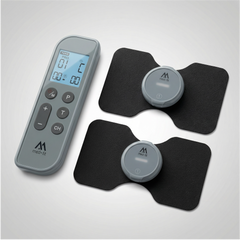
Combo 2: TENS, EMS and Massage Machine. Two wireless modules, each controlled separately from one remote, so one area can have TENS while another has muscle stimulation. It has 18 programmes, a timer from 10 minutes to continuous, magnetic snap-on pads and USB-C charging.
Combo 1 and Combo 4. The same TENS, EMS and massage programmes with one module or four. Combo 1 suits one area, such as a knee or shoulder. Combo 4 lets you treat up to four areas at once.
Med-Fit Wireless 2 Channel TENS and EMS Machine. Two rechargeable modules with six TENS and three EMS programmes, controlled by remote. It comes with a large lumbar pad for the lower back, plus butterfly and round pads for other areas. The Wireless 4 Channel works the same way with four modules.
Painless TENS and EMS Machine. A single channel wireless TENS machine with a remote and the same nine programmes. A straightforward first machine if you only need to treat one area.
Sensitive skin versions. If standard pads tend to irritate your skin, the Painless, Wireless 2 Channel and Wireless 4 Channel machines are also sold with gentler sensitive skin pads.
Wired TENS machines
Med-Fit 1 Dual Channel TENS Machine. A simple, dependable wired TENS machine with separate controls for each channel and three modes (constant, burst and modulation). You can set the pulse rate and pulse width yourself. Runs on two AA batteries.
Med-Fit 3 Dual Channel TENS Machine. A digital wired TENS machine with a large, clear display and five modes. Good if you like to see your settings on a screen. Runs on a 9V battery.
Premier Pro TENS and EMS Machine. A rechargeable dual channel wired machine with TENS, EMS and massage programmes, plus a fully adjustable manual setting with memory. Suits people who like control over frequency, pulse width and timer.
4 Channel TENS and EMS Machine. A wired machine with four channels and adjustable TENS and EMS settings, for covering several areas at once. Runs on AA batteries.
For period pain
Fem-Ova Period Pain Relief. A slim, rechargeable wireless TENS machine made for period pain, with a choice of low or high heat. Our guides to TENS for period pain and TENS for endometriosis explain how it's used.
How to use a TENS machine
- Read the manual and check TENS is safe for you (see the safety section below).
- Wash and dry the skin where the pads will go. Creams and oils stop them sticking.
- Place the pads on or around the painful area, with a gap so they don't touch. For back pain, they usually go either side of the spine rather than on it.
- Connect the pads with the machine switched off, then switch on and pick a programme.
- Turn the intensity up slowly until the tingling feels strong but comfortable. It should never hurt.
- When you finish, switch off before removing the pads, then put them back on their backing sheet.
Session times vary between machines, so follow your manual. Many of our manuals suggest sessions of an hour or more for ongoing pain. Our step-by-step guide on how to use a TENS machine covers wired and wireless machines, pad placement and what to do if something doesn't feel right.
TENS machine pads and accessories
Pads are the part of a TENS machine that wears out. Most self-adhesive pads last 15 to 30 uses, depending on your skin and how you store them. Wired and wireless pads aren't interchangeable, and wireless pads only fit the machine they're made for, so check which you need before you order.
Using a TENS machine safely
Do not use a TENS machine if you:
- have a pacemaker or another implanted electrical device
- have epilepsy
- are being treated for deep vein thrombosis (DVT)
- are pregnant or in labour
Never use one:
- on your neck, head, mouth or eyes, or across your chest
- on your chest and back at the same time
- on broken, irritated, infected or numb skin
- while driving, using machinery, in the bath or shower, or while asleep
Speak to your GP or pharmacist first if you have a heart condition, or if your pain is severe, new or unexplained. If your skin becomes red, itchy or irritated under the pads, switch off, remove the pads and let it settle. Our wireless TENS machines are not suitable for children under 16.
None of our TENS machines are suitable for use in pregnancy or labour. If you're pregnant and looking for ways to manage pain, speak to your midwife or GP.
Buying a TENS machine from Med-Fit
We're a UK company, and our team is happy to help you choose the right TENS machine. If you have a long-term condition or disability, you may be able to buy your TENS machine without VAT. Check the VAT relief eligibility, or contact our team with any questions.